Refer a lead and earn a share — Your Client, Your Cut
A client you cannot serve is still worth money. Any real client in your CRM — a listing enquiry, a Facebook or Google Ads lead, even your own reference — can go out to the broker network on Realty of India as a requirement with the name and number hidden. Brokers who have a matching property send you a Connect request, and you agree your cut in the chat before you share anything. Aapka client, aapka cut.
Pick the client you cannot serve
Not every lead is yours to close. The ones you cannot serve are the ones that can still pay you.
-
Open Leads and tap the "Earn a share" filter
The count beside it is how many of your leads can go out right now. Tap it and you get exactly those.
On your phone 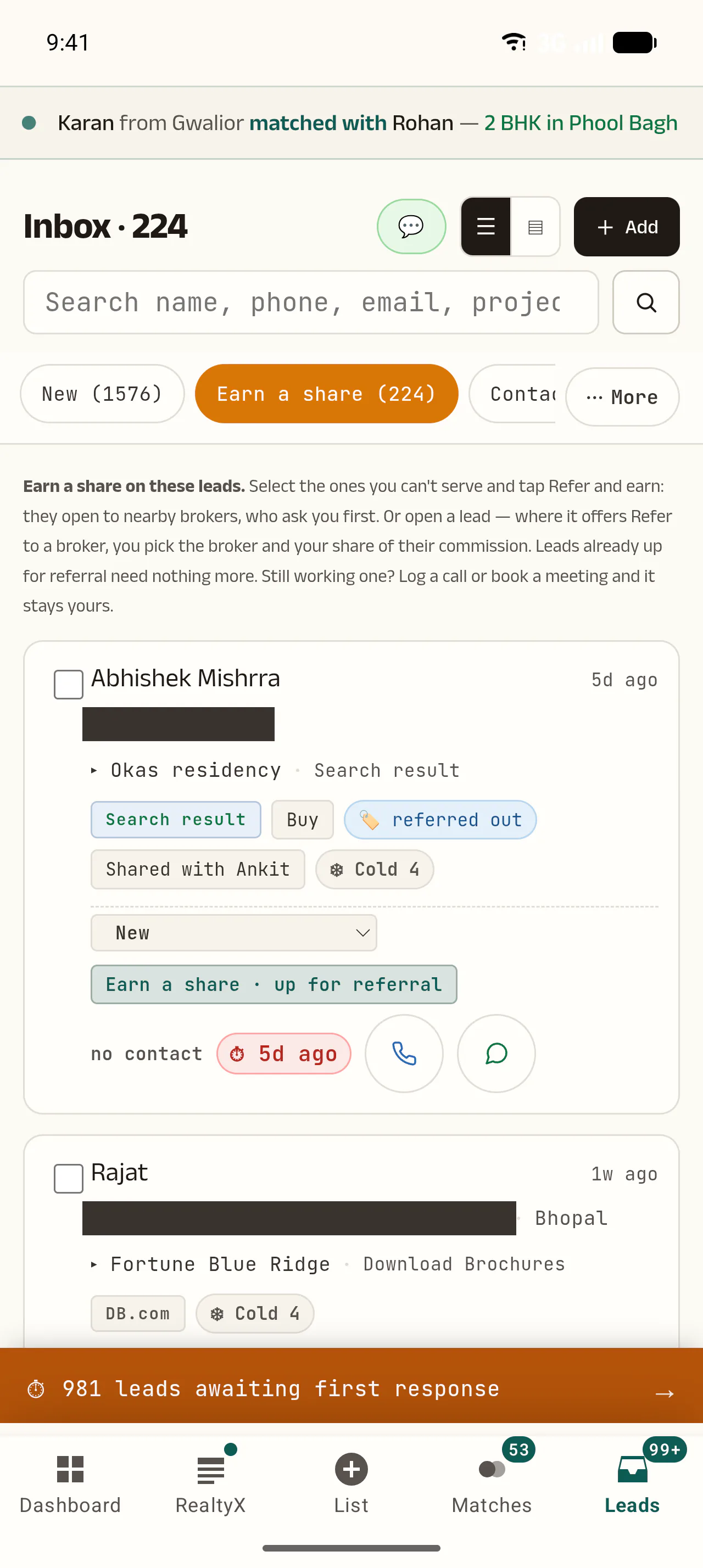 1
- Tap this. The number beside it is how many of your leads can go out right now.
When this happens You work in sales, and a rental enquiry lands in your inbox. It is a real client — just not your client.
-
Tick the leads you cannot serve
Every card has a checkbox. Tick one or ten and a bar appears at the bottom with your options.
On your phone 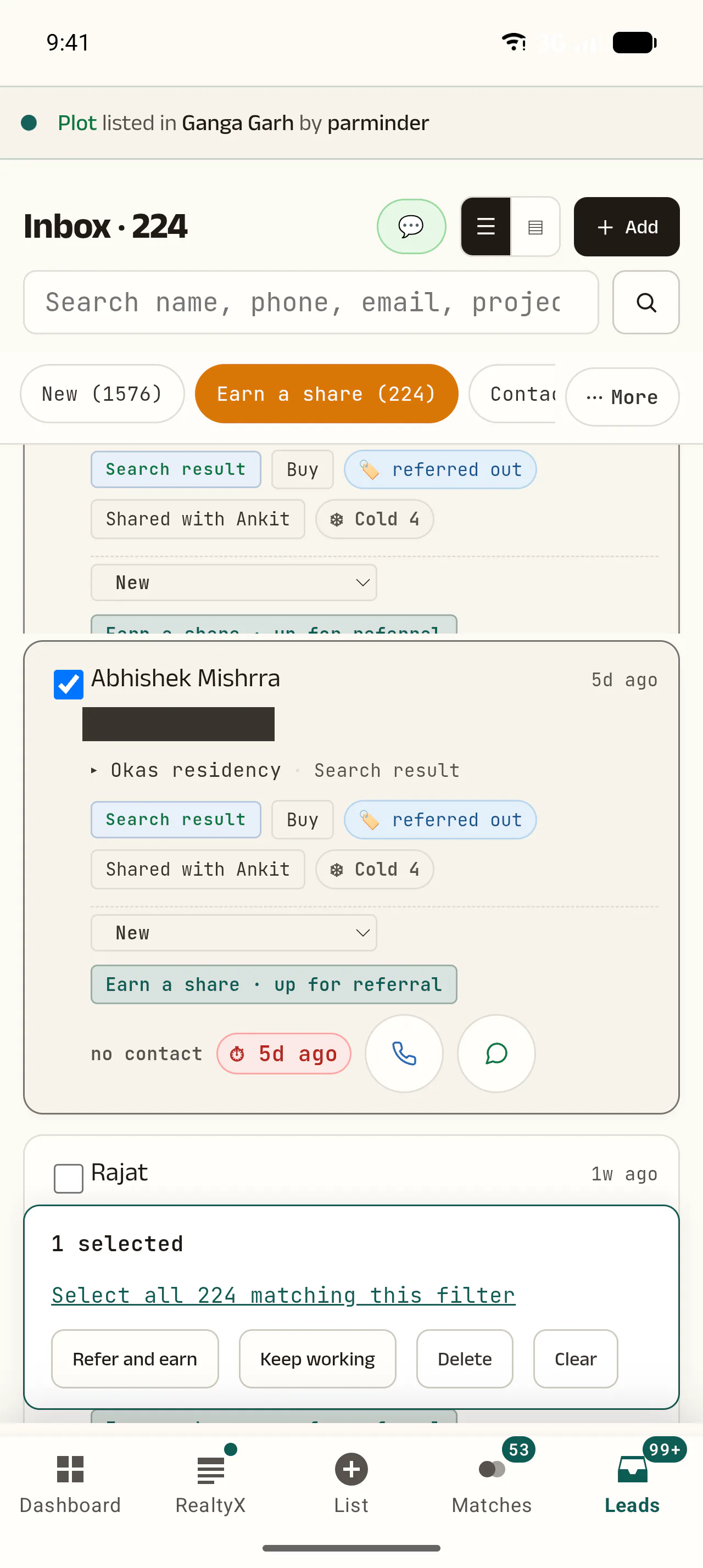 1
2
- The bar tells you how many you have picked.
- Then tap this. One tap sends all of them out.
When this happens Fifty old enquiries you were never going to call. Instead of deleting them, send them out in one go.
-
Still working it? Tap "Keep working"
Call or WhatsApp the client from the lead, tap "I spoke to them", book a meeting, or tap "Keep working", and the client stays with you. Leave a listing enquiry untouched for 14 days and it opens by itself — you still earn a share.
Put them on the network
Two doors. Which one you use depends on where the lead came from.
-
Tap "Refer and earn" and read the confirmation
A pop-up says exactly what will happen before anything moves. Tap OK and those leads open to the network.
On your phone 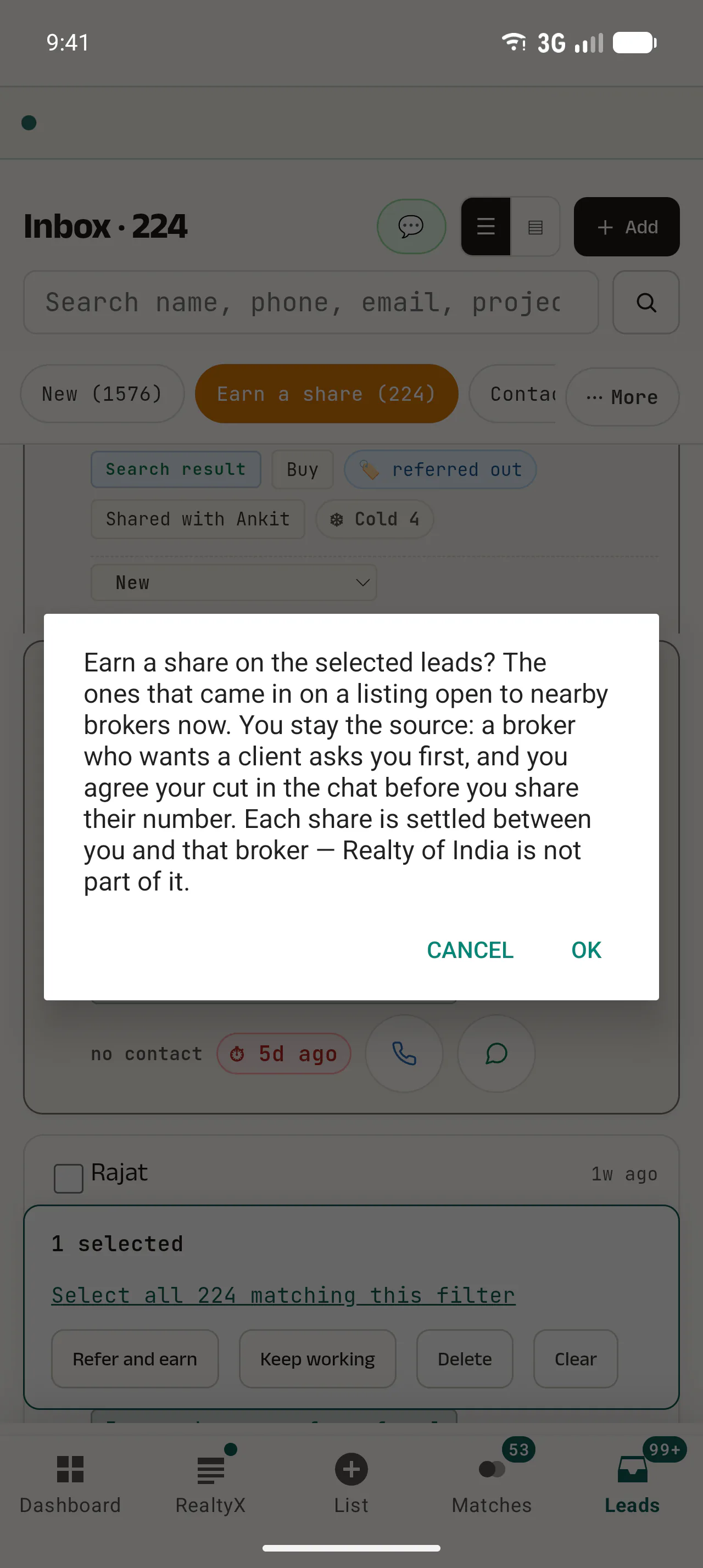 1
- This line is the rule for the bulk path: only leads that came in on a listing go out this way.
-
Or open one lead — the "REFER AND EARN" block
For a single client, open the lead and scroll down. One that is still only yours shows two doors, plus "Keep working".
When this happens One client you want to place carefully, with a broker you choose — not the whole network.
-
A Facebook, Google or your-own-reference lead? Tap "Make this a buyer profile"
These carry no requirement, so they cannot go out on their own. The button opens a short window — property type, buy or rent, locality, BHK, budget — mostly prefilled, with the client's own message beside it.
On your phone 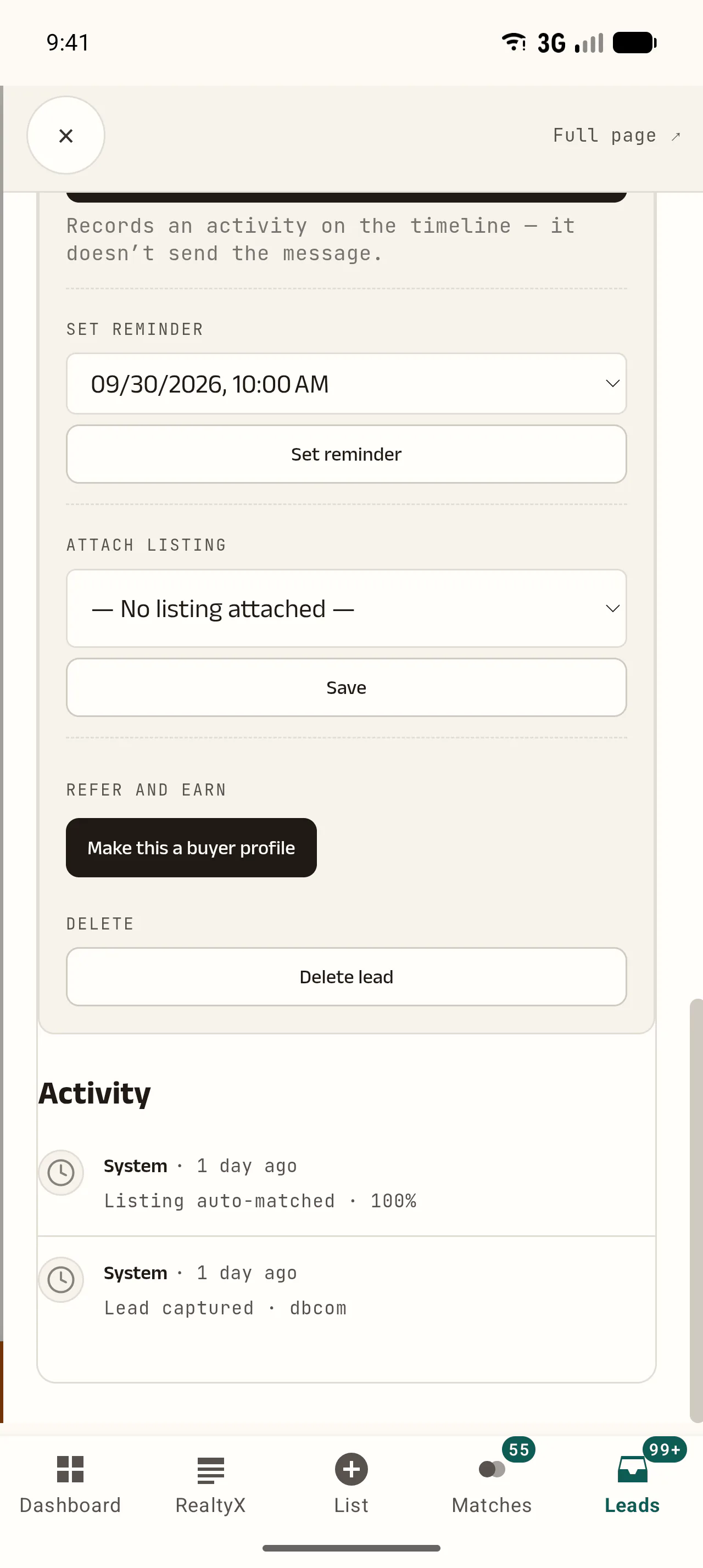 1
- An ad lead has no requirement yet. This is how you give it one.
When this happens A Meta Ads lead who wants a 2 BHK on rent while you only do sales. Two minutes of tapping and it is out on the network.
-
Tick the line, then "Make it a buyer profile"
One line to confirm: a real client, and you choose who gets their number. Tap the button and the requirement is live.
On your phone 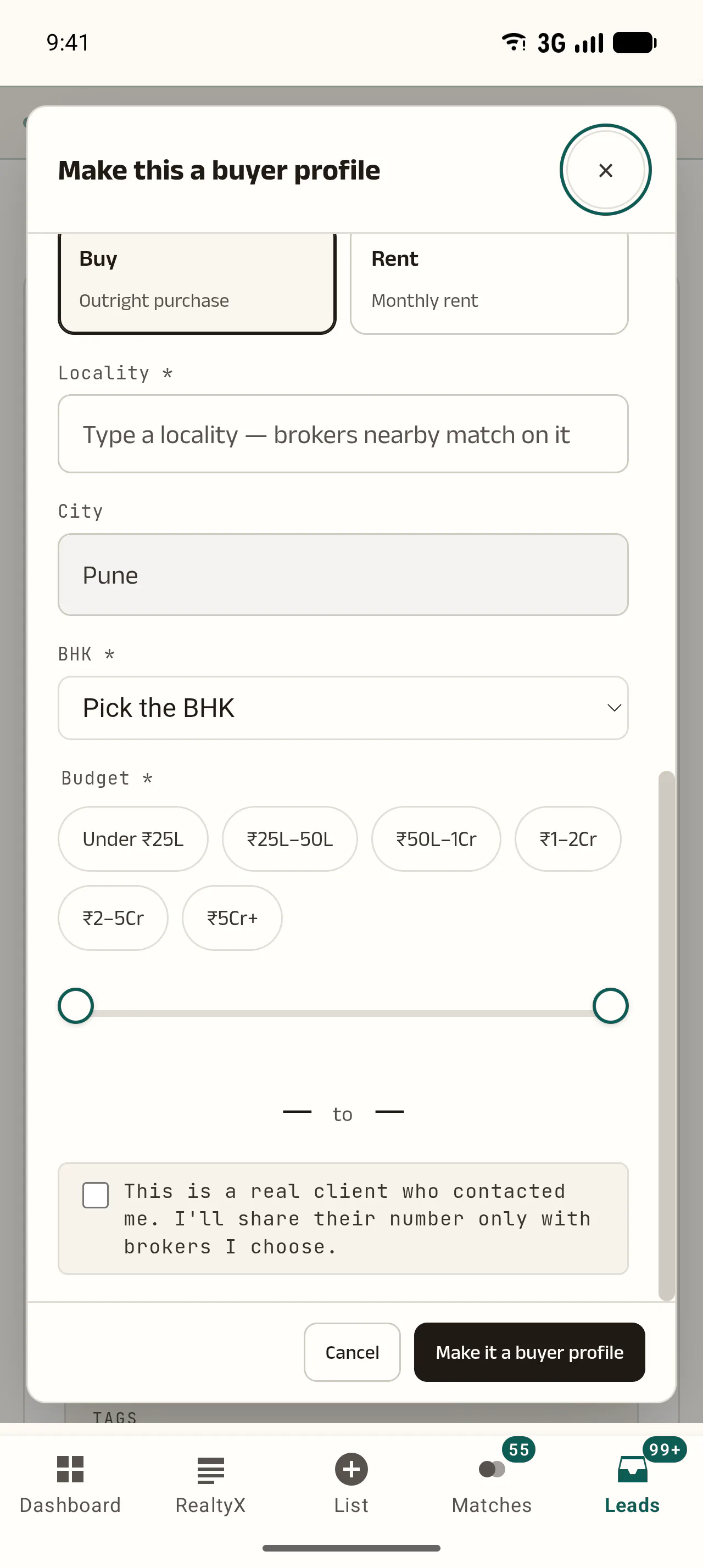 1
2
- Tick this. It is the promise that the number stays with you.
- Then this — and the requirement is live on the network.
-
The other door: "Refer to a broker"
Pick up to three brokers yourself and write your share, 5% to 75%. It goes to one at a time, 24 hours each, and locks in when someone accepts.
When this happens A client worth placing with someone you already trust, on terms fixed in advance.
-
What cannot become a buyer profile
Cold uploads, developer sign-ups, channel-partner leads, sellers, anyone with no phone number, and anything older than 90 days.
A broker comes to you
Now you wait — and the other side sees far less than you think.
-
The client's identity stays hidden
Other brokers see initials and the requirement — nothing else. Realty of India never shows your client's number to another broker.
On your phone 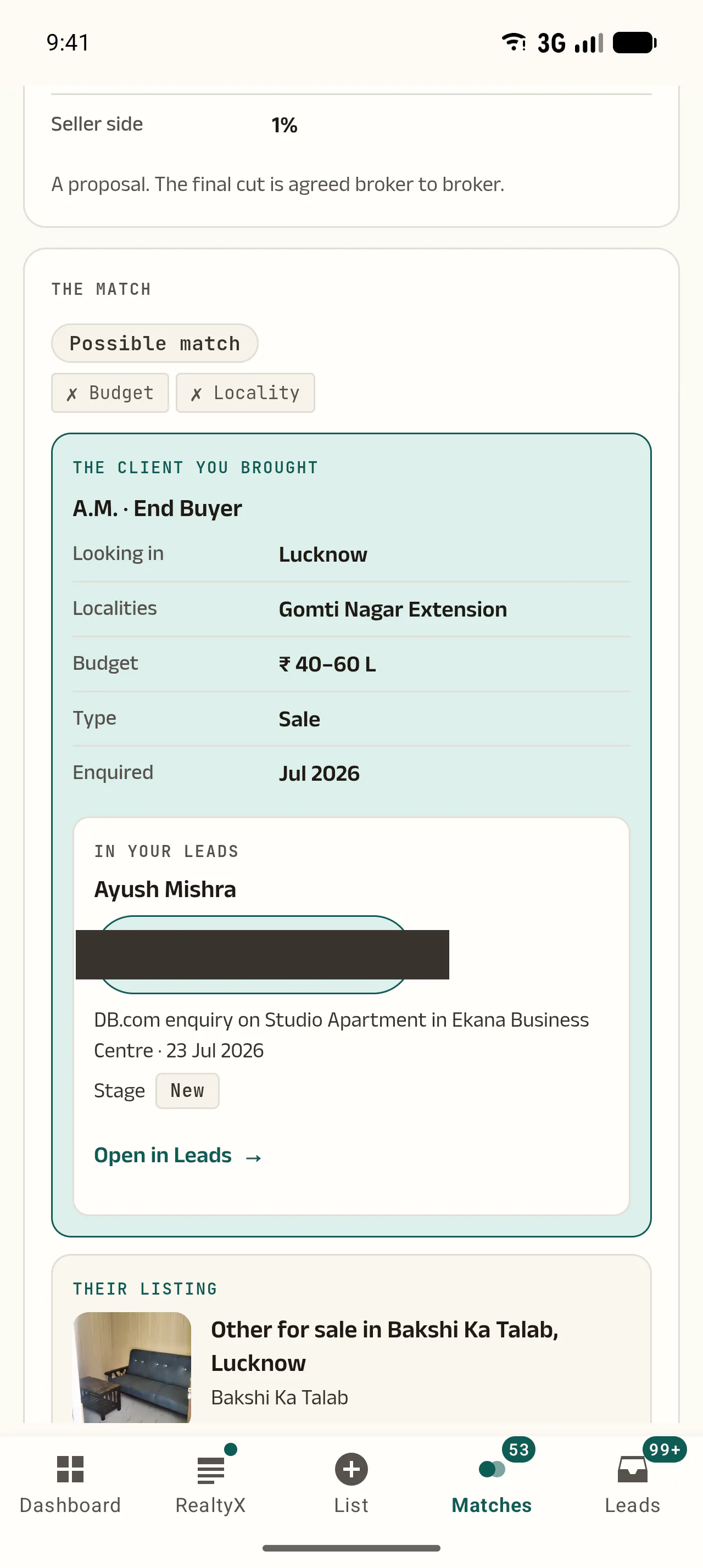 1
2
- Your client, as the network sees them.
- Initials only. No name, no number, no email — just what they are looking for.
When this happens The real worry: "if I share this lead, will I lose the client?" You cannot lose what the platform never hands over.
-
Your requirement goes out to matching listings
Every broker in that city holding matching inventory sees it. Each match carries a band — Hot, Strong or Possible — and Possible says what differs.
-
A Connect request arrives
You get a bell, a push and an email. Every request sits in one place: the Connect dashboard.
-
Read the whole request before you accept
Their listing, their message, the commission they propose and how good the match is — all of it before you answer. You have 7 days.
On your phone 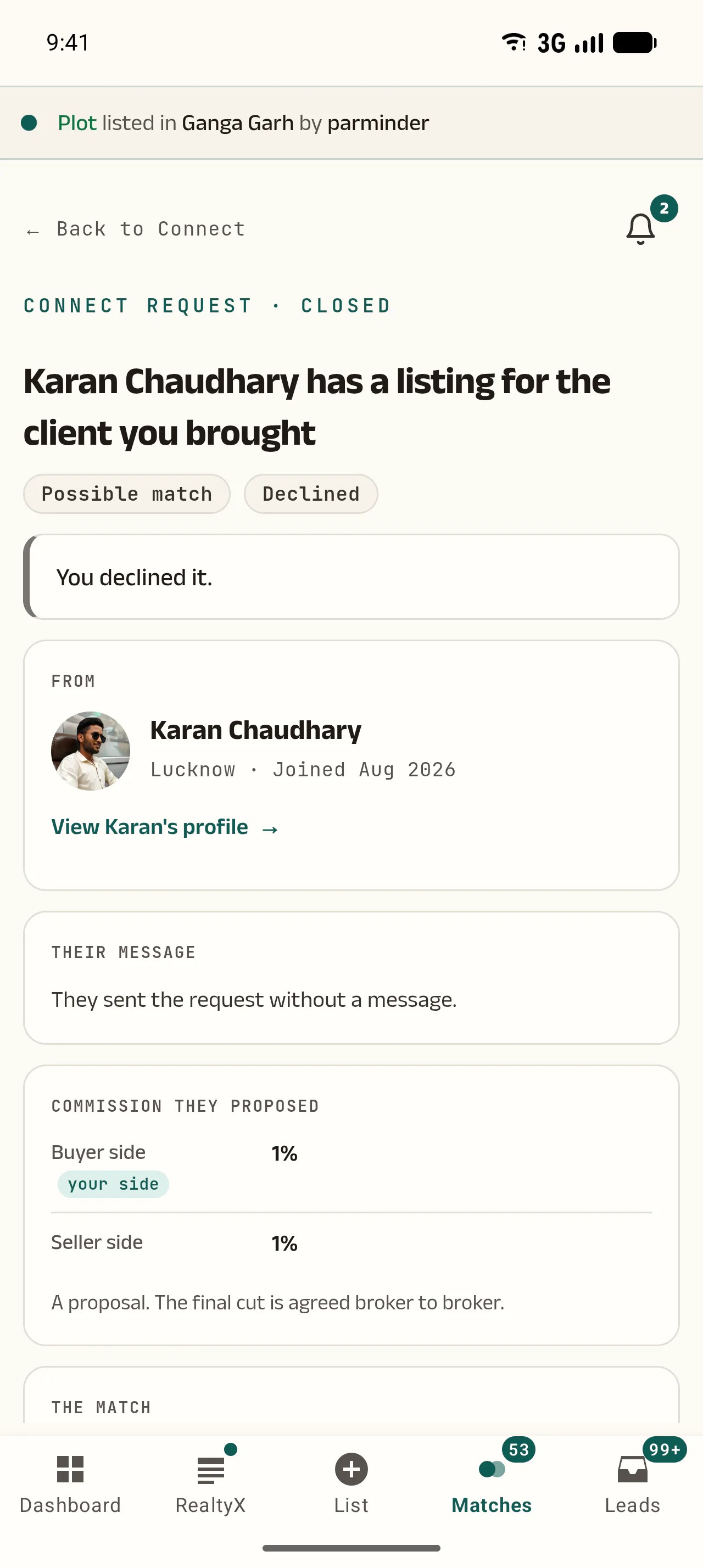 1
- What they are offering, and which side is yours. It is a proposal — the final cut is yours to agree.
When this happens Before you say yes to anything, you can see their property, their terms and how good the match really is.
Agree, share, and get it on record
Terms first. The number second. Both CRMs remember who brought the client.
-
Accept, then agree your cut in the chat
Accepting opens a chat. Settle how much you get and when — on token, on agreement, on registration, or on rent agreement. Realty of India takes none of it.
When this happens Baat pakki karne ke baad hi number jaata hai — first the terms, then the client.
-
Only when it is settled, tap "Share my client's contact"
You tick a disclaimer, your consent is recorded, and the number goes. Before that, nobody has it.
On your phone 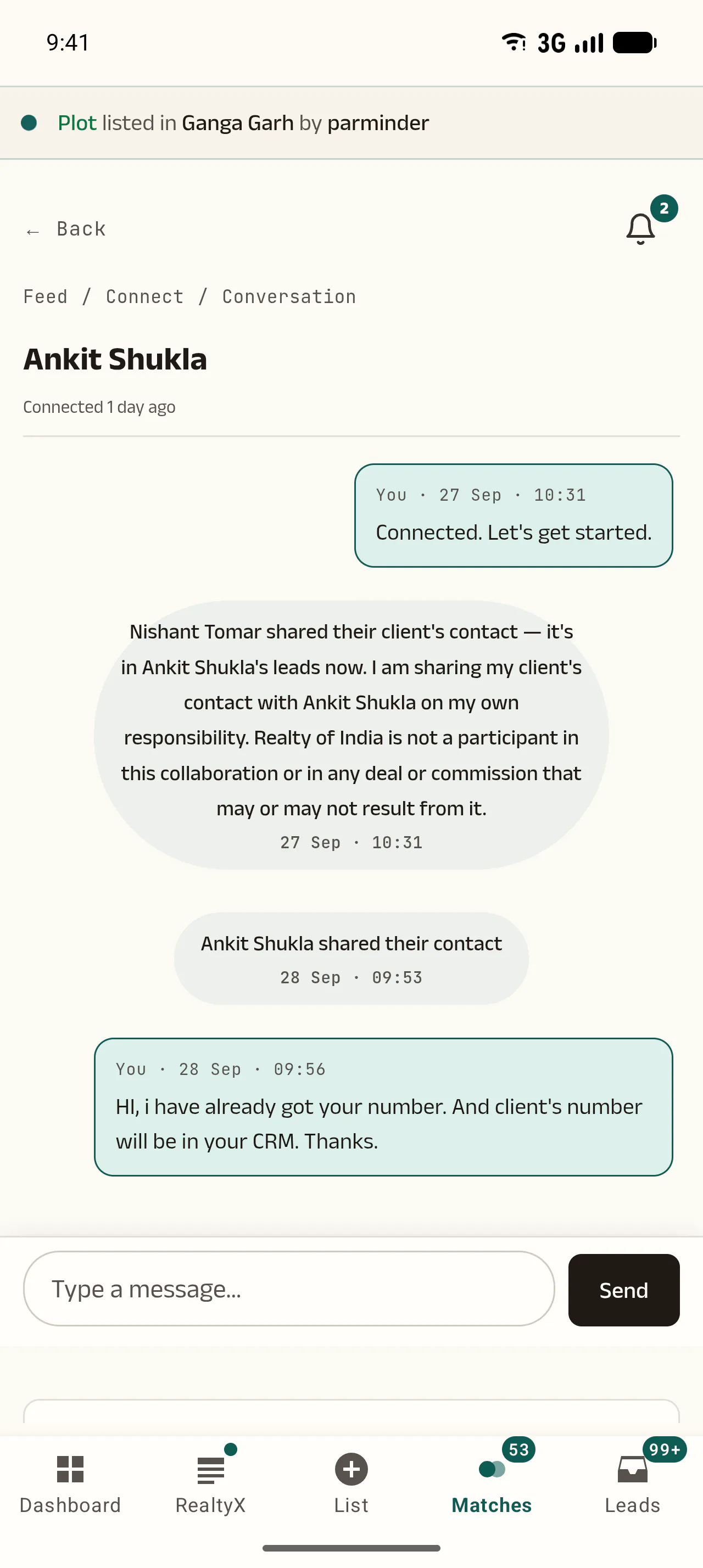 1
- Realty of India records the hand-over — and states plainly that it is not part of your deal.
-
The client reaches their CRM with your name on it
They get the lead with you named as the source. Your own CRM records where it went, and "Mark deal closed" in the same chat records the sale.
Open it now
These open inside Realty of India — you will be asked to sign in first.
- Leads that can earn you a share Your inbox, already filtered to the ones that can go out.
- Your Connect requests Who has asked about your clients, and what you have sent.
- Clients you referred to a broker The targeted path: who took them, and on what share.
- Your matches Buyers on the network your listings fit.
- The referral switch Whether a listing enquiry you stop working opens on its own after 14 days.
Common questions
- Can any lead be referred?
- Almost any real client, yes. An enquiry that came in on one of your listings already carries its requirement, so it is ready to go. Any other lead — Facebook or Instagram ads, Google Ads, a connected webhook, WhatsApp, one you typed in yourself, your own reference — becomes one when you open it and tap "Make this a buyer profile", fill the short window and confirm. What cannot: a bulk cold upload, a developer sign-up, a channel-partner lead, a seller, a lead with no phone number, and anything older than 90 days.
- What is the difference between a lead and a buyer profile?
- A lead is a person in your CRM — a name, a number, wherever they came from. A buyer profile is that person's requirement written in a way the network understands: what they want, where, and at what budget, with the name and number kept out of it. Only a buyer profile can be matched against other brokers' listings, which is why a Facebook lead has to be turned into one first.
- How do I know which of my leads can be referred?
- Your Leads inbox has a filter called "Earn a share" with a count beside it — that is exactly how many can be referred right now. Tap it and everything in the list is eligible. You never have to open leads one by one to check.
- Will the other broker see my client's number?
- No. They see the requirement only — what the client wants, where, and at what budget. The name shows as initials; the phone and email do not show at all. Realty of India never reveals your client's number to another broker. It moves only when you tap "Share my client's contact" in the chat yourself.
- Who decides my commission?
- The two of you. With "Open to any broker" no number is recorded up front — you settle the cut in the chat. With "Refer to a broker" you write your share yourself and it is recorded the moment they accept. Realty of India does not take, hold or settle commission.
- Once I refer a lead, is the client no longer mine?
- You stay the source. The broker who wants the client has to ask you first, and you share the number yourself — and only after the cut is agreed. When the client lands in their CRM, your name is on it as the source.
- What is the difference between "Refer to a broker" and "Open to any broker"?
- With "Refer to a broker" you pick up to three brokers yourself and write your share, between 5% and 75%; the offer goes to one at a time and each gets 24 hours. With "Open to any broker" the requirement goes to the whole network, nothing is fixed in advance, and any broker who can serve your client sends you a Connect request.
- How long do I have to answer a Connect request?
- Seven days, with reminders along the way. If you do not answer it closes on its own, and that broker can ask again after a short pause.
- Does referring a lead cost anything?
- No. Referring is free, accepting a Connect request is free, and Realty of India takes nothing when a deal closes. How many Connect requests you can send is shown on the screen you send them from.
- What happens to a lead I do not touch?
- If the referral switch is on in your settings, a listing enquiry with no call and no meeting for 14 days opens to nearby brokers by itself — and you can still earn a share on it. To keep one, call or WhatsApp the client from the lead, tap "I spoke to them", or book a meeting. A reply from the client brings it back to you alone.